


Your Home. Smarter. Safer. More Connected.
Take complete control of your home Wi-Fi with CVCTX’s powerful SmartHome services.
Whether you’re protecting your family, managing screen time, working from home, or simply enjoying fast, reliable internet, our SmartHome solutions put you in control—all from one easy-to-use mobile app.
Upgrade to a qualifying CVCTX 1+ Gig plan and unlock a complete suite of tools designed to protect, manage and optimize your connected life.
One App. Four Powerful Services.

What it Does: Manage your entire home Wi-Fi network

What it Does: Advanced cybersecurity for every connected device

What it Does: Parental controls, screen time and content management

What it Does: Cellular failover and priority connectivity during supported outages

Why CVCTX Customers Will Love SmartHome Services
- Easy-to-use mobile app
- Greater control over your home network
- Better online safety
- Improved family internet management
- Reliable connectivity for work and school
- Premium features that grow with your family’s needs

Your Home Wi-Fi Command Center
CommandIQ is the easy-to-use mobile app that gives you complete control over your home’s Wi-Fi network from anywhere.
With just a few taps you can:
- View every connected device
- Rename devices for easy identification
- Share guest Wi-Fi securely
- Run speed tests
- Pause internet to any device
- Receive network alerts
- Troubleshoot without calling support
The app also gives you access to premium SmartHome features like ProtectIQ, ExperienceIQ and HomeOfficeIQ.
Perfect for every connected home.
CommandIQ App Overview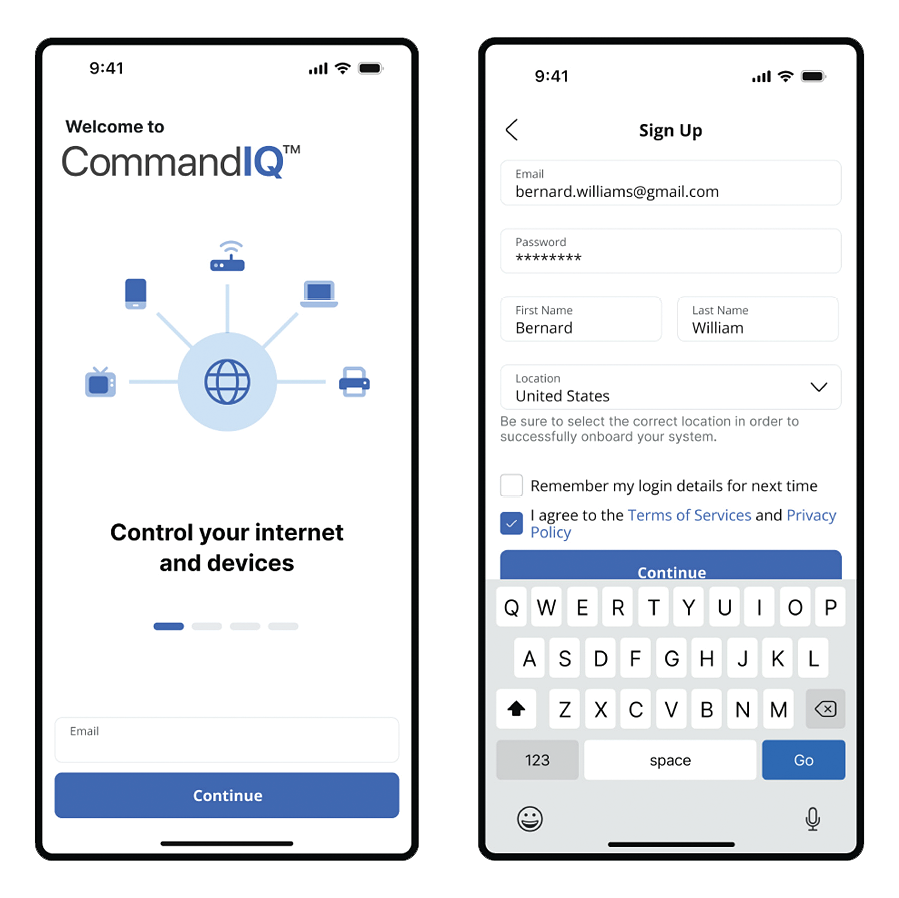

24/7 Cybersecurity for Your Entire Home
Every device connected to your Wi-Fi can be vulnerable—from laptops and phones to smart TVs, gaming consoles and security cameras.
ProtectIQ continuously monitors your network and automatically blocks online threats before they reach your devices.
Features
- Network-wide cybersecurity
- Automatic malware protection
- Virus & ransomware protection
- Blocks malicious websites
- Real-time security alerts
- No software to install on individual devices
Benefits
- Peace of mind
- Protection for every connected device
- Automatic security that works behind the scenes

Smarter Parental Controls & Family Internet Management
Help your family build healthier online habits while keeping children safe.
ExperienceIQ makes it easy to manage internet access for every member of the household.
Features
- Create family member profiles
- Set daily screen time limits
- Pause internet instantly
- Schedule bedtime internet access
- Filter inappropriate content
- Prioritize learning, work or gaming devices
- View app usage and online activity
Perfect For
- Encouraging healthier screen habits
- Families with children
- Students
- Remote learners
- Managing gaming time


Stay Connected When It Matters Most
Today’s homes depend on reliable internet for work, school, security systems and smart devices.
HomeOfficeIQ provides intelligent cellular failover that helps keep your most important devices connected during qualifying internet outages (when paired with a compatible cellular hotspot). It integrates with CommandIQ while maintaining ProtectIQ security and ExperienceIQ policies.
Features
- Cellular backup connectivity
- Prioritize work devices
- Keep video meetings running
- Protect critical smart home devices
- Easy setup through CommandIQ
Ideal For
- Remote workers
- Home businesses
- Students
- Smart homes
- Anyone who depends on reliable internet
Ready for a Smarter Home?
Experience more than just fast internet.
Take control of your Wi-Fi, protect your family, and enjoy the confidence that comes with a smarter connected home.
Download the CommandIQ App and unlock a better-connected home.


CVCTX SmartHome suite of services includes CommandIQ, ProtectIQ, ExperienceIQ and HomeOfficeIQ.
SmartHome requires 1+ Gig plans or higher and certain CVCTX equipment.
CVCTX SmartHome Frequently Asked Questions
General Questions
CVCTX SmartHome is a premium Wi-Fi experience that gives you more control over your home network. Using the CommandIQ® app and a compatible CVCTX router, you can manage your Wi-Fi, monitor connected devices, protect your family online, improve performance, and receive advanced security features—all from your smartphone.
Yes. A compatible CVCTX router is required to access SmartHome features such as ProtectIQ®, ExperienceIQ®, HomeOfficeIQ®, and advanced network management.
Your router options may vary depending on your service package. Contact CVCTX for current equipment options and pricing.
You may use your own router for internet service, but SmartHome features require a compatible CVCTX-managed router..(Command IQ only works with Calix routers)
For customers on qualifying Gig plus service plans, Simply download the CommandIQ® app from the Apple App Store or Google Play Store and sign in using your account information. Once connected to your compatible CVCTX router, you’ll have access to your SmartHome dashboard.
Network Management
With the app you can:
- Receive notifications about your network
- View every device connected to your Wi-Fi
- Change your Wi-Fi name and password
- Create a guest network
- Run internet speed tests
- Pause internet access for individual devices
- Prioritize important devices
- Monitor network performance
Yes! The app displays every device connected to your home network, making it easy to identify unknown devices.
Absolutely. You can update both your Wi-Fi network name (SSID) and password at any time directly within the app.
Yes. You can create a separate guest network to keep visitors connected while protecting your personal devices and information.
Family Features
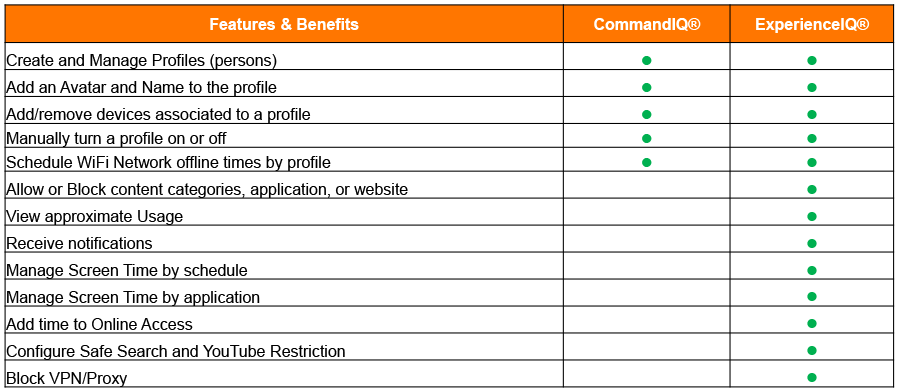
ExperienceIQ helps families manage screen time by allowing you to:
- Manage online time
- Set internet schedules
- Pause internet access
- Filter age-appropriate content
- Assign devices to family members
Yes! You can instantly pause internet access for specific devices or family members with a single tap.
Yes! You can instantly pause internet access for specific devices or family members with a single tap.
Yes. ExperienceIQ includes content filtering options to help block websites based on age and content categories.
Yes. Create individual profiles for each family member and customize screen time, schedules, and content filtering based on age and needs.
Absolutely. You can pause internet access instantly or schedule recurring offline times.
Yes. The app allows you to prioritize bandwidth for gaming, streaming, or work so the activities that matter most receive the best available performance.
Security
ProtectIQ provides automatic cybersecurity protection for every device connected to your home network by helping detect and block online threats before they reach your devices.
No. CVCTX does not monitor your personal browsing activity. The SmartHome app provides network management and security features while respecting customer privacy.
ProtectIQ helps protect:
- Wi-Fi connected appliances
- Computers
- Smartphones
- Tablets
- Smart TVs
- Gaming systems
- Security cameras
- Smart home devices
- Streaming devices
ProtectIQ provides an additional layer of network security, but CVCTX still recommends keeping antivirus software and device operating systems updated. Many smart devices can’t run antivirus software, making network-level protection important.
Performance
HomeOfficeIQ helps keep you connected when your primary internet connection is unexpectedly interrupted. By setting up a backup internet source—such as your mobile phone’s hotspot or another compatible wireless connection—in the CommandIQ app, your compatible CVCTX router can automatically switch to that connection during an outage.
Before an outage occurs, you can choose which devices are most important, such as your work computer, security cameras, or smart home devices, so they remain connected while using the backup connection.
Yes. Run internet speed tests directly from the app to monitor your connection and troubleshoot performance.
Smart Home
Yes. CommandIQ integrates with several SmartHome services and allows you to manage supported devices from one convenient location.
Before an outage occurs, you can choose which devices are most important, such as your work computer, security cameras, or smart home devices, so they remain connected while using the backup connection.
Account & Support
CVCTX SmartHome is included at no additional monthly cost for customers on eligible GIG+ internet plans. A compatible CVCTX router is required to access the full suite of SmartHome features. Contact CVCTX for current router pricing and package availability.
Simply download the CommandIQ app on your new device and sign in with your existing account.
Use the “Forgot Password” option on the login screen to reset your password.
Try these quick steps:
- Restart your router.
- Make sure you’re connected to your CVCTX Wi-Fi network.
- Update the CommandIQ app.
- Restart your mobile device.
If you still need assistance, contact CVCTX Technical Support.